






















Service Hotline
News

News

What is type-c? type-c in usb
2021-12-28
1221
USB Type-C, also known as USB-C, is a hardware interface form of Universal Serial Bus (USB). The biggest feature of its appearance is that its upper and lower ends are exactly the same. Compared with Micro-USB, this means that users no longer need to distinguish between the front and back of USB, and can be inserted in both directions.
Speaking of form, the mini-USB and micro-USB just mentioned are also like this, but these two are compared to standard USB. And this standard USB is actually called USB Type-A.
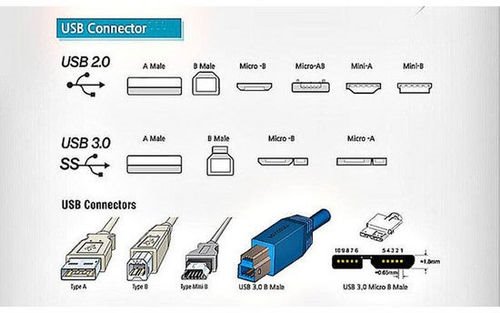
This figure roughly explains the different forms of USB. It can be seen that the interfaces corresponding to different versions (2.0/3.0) are different. Basically, the USB 3.0 era was made like this to be compatible with USB 2.0.
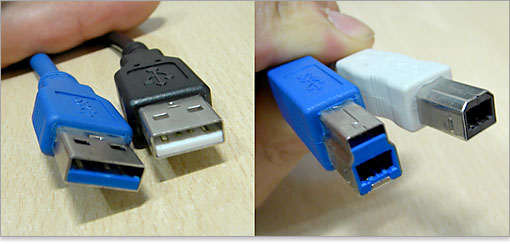
Type-A USB 3.0 and 2.0 have the same shape, and devices are compatible with each other, but Type-B is different. The wiring of Type-B version 2.0 can be plugged into the interface of version 3.0, but not the other way around.
Speaking of wiring and interfaces, here we also need to learn about the male and female ports.
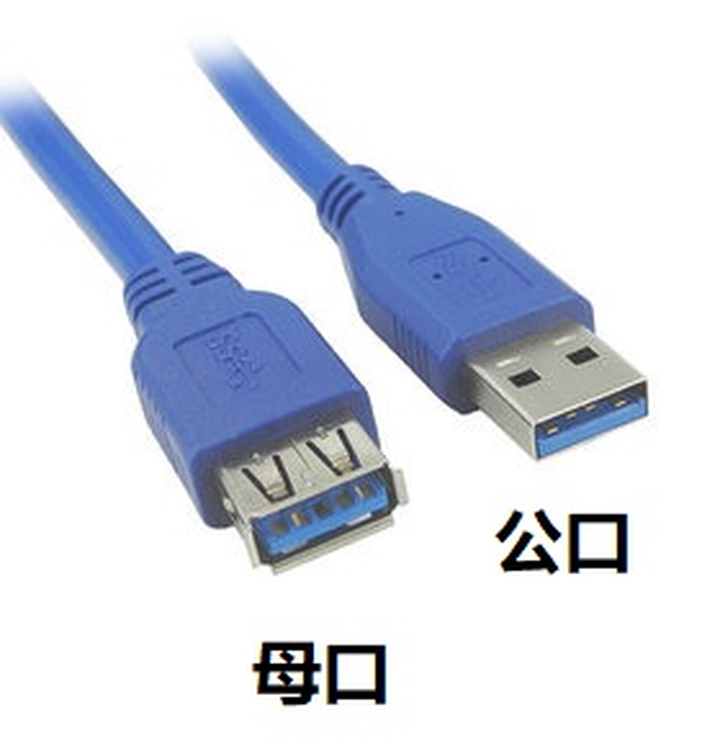
When connecting a device to a computer, the interface on the computer is generally called the female port, and the interface on the cable is called the male port. In layman's terms, the male mouth is the mouth to be "inserted into", while the female mouth is the mouth to be "inserted into". As for why it is called so, "Male" is also mentioned in the above picture. It must be that foreigners have made this distinction a long time ago, and it is easier to understand using the metaphor of "image".
As mentioned just now, the Type-B female port is backward compatible, but the male port is not backward compatible. This is the reduction in compatibility caused by the iteration of new USB versions. Now only Type-A can achieve two-way compatibility.
Under this situation, USB had to consider a new form, and this is how Type-C came about.
USB Type-C was proposed along with the USB 3.1 standard. Since it is a new form, TypeC does not have the problem of being "compatible" with old devices.
The word "version" has been mentioned in the previous explanation. In fact, it may easily cause ambiguity in some places. Type-A and Type-C are called USB interface form versions, while 2.0 and 3.0 are called USB interface specification versions.
For example, a piece of clothing, its appearance design is similar to the former, while its size and material are similar to the latter. The former allows USB to be applied to various devices, and the shape is determined according to the characteristics of the device. For example, Type-B is common on printers. I personally speculate that this interface is more stable and ensures stability when transmitting data; while the latter is because the USB organization wants to adapt to the development of the times to improve the functions of USB itself. The most intuitive improvement is that each generation of USB can increase the bandwidth a lot. The theoretical bandwidth of USB2.0 is 480Mbps, while USB3.0 is 5Gbps, which is doubled many times.
Related Recommendations